Inclusion and Innovation: How B2B Companies Benefit from Digital Accessibility

Note: This article was first published in October 2024 and was updated with the latest technical information in October 2026. The update took into account the BFSG requirements in effect since June 2025, the WCAG 2.2 guidelines, and current developments in the fields of AI and digital accessibility.
Peter is an experienced engineer at a company that manufactures industrial equipment. Over the years, he has accumulated a wealth of knowledge, but as his vision continues to deteriorate, it is becoming increasingly difficult for him to use the dealer portal through which he places orders and accesses technical information. The text is too small, and the contrast is insufficient to clearly make out all the details. With an accessible design that allows him to zoom in on content and adjust contrast levels, Peter could continue to work productively while passing on his valuable knowledge to the next generation.
Why? Because accessibility not only meets legal requirements but also offers strategic advantages – for both B2C and B2B companies.
6 good reasons why accessibility is crucial for our customers
1. Legal requirements Starting in 2025 – Avoid legal risks
The BFSG ensures that people with disabilities can participate on an equal footing in the digital space. Starting on June 28, 2025, websites and mobile applications of B2C companies must comply with accessibility requirements to ensure access for all users. The legal requirements are based on European Directive (EU) 2019/882 and apply to numerous industries, including e-commerce, services, financial institutions, and the tourism industry.
B2B companies may also be affected – for example, if private individuals can register and place orders in their online store or portal. Micro-enterprises (fewer than 10 employees, with an annual turnover of no more than 2 million euros) that offer services are exempt.
Since early 2026, the State Market Surveillance Authority (MLBF) has been actively monitoring compliance. Violations can result in fines of up to 100,000 euros, as well as cease-and-desist letters from competitors. Here is the legal framework: Accessibility – Laws and Guidelines
2. Greater reach – Reach All users
Accessibility doesn’t just mean that people with disabilities can use a website or app. It ensures that digital products are accessible to a broader audience – including older adults, users with temporary limitations, or those with slow internet connections. According to the WHO, over one billion people worldwide live with some form of disability – that’s a huge potential market that companies shouldn’t ignore.
With accessible digital products, companies can expand their reach, tap into new target audiences, and increase overall user satisfaction. It’s about enabling access for everyone – regardless of physical, mental, or technical limitations.
3. Better user experience – Optimize the user experience for everyone
Well-implemented accessibility improves the overall user experience for all users, not just people with disabilities. Positive UX factors lead to higher conversion rates, longer session durations, and lower bounce rates.
For B2C companies, this means higher customer satisfaction and better business results. But B2B companies also benefit: partners, employees, and customers who can use a website or application more effectively are happier and more efficient.
4. Competitive advantage – Set yourself apart as a progressive, inclusive company
Accessibility can also be a clear point of differentiation for companies in the marketplace. While many companies may be slow to implement legal requirements, pioneers can benefit from a positive public image. Especially in industries with intense competitive pressure, accessibility can become a decisive factor that makes all the difference.
An accessible website demonstrates that a company takes responsibility, acts inclusively, and addresses the needs of all users. This not only strengthens the brand image but also contributes to greater customer loyalty.
5. SEO benefits – Accessibility improves your visibility
An accessible website is not only easier to access for people with disabilities but also for search engines like Google. Clear heading structures, descriptive alt text for images, and well-structured HTML code improve search engine indexing. In addition, fast loading times and mobile optimization – both core aspects of accessibility – boost SEO performance. Websites that meet these requirements are easier to find and achieve higher rankings, which leads to more traffic and revenue in the long term. Accessibility is therefore a strategic advantage for your online visibility.
6. Save costs – Incorporate accessibility early rather than making costly retrospective changes
Experience from numerous digital projects shows that the earlier accessibility is incorporated, the lower the costs. If accessibility requirements are only addressed shortly before launch or after an audit, this often results in additional design, development, and testing efforts.
Embedding accessibility into the Design System is particularly effective. If colors, forms, navigation elements, components, and interaction patterns are designed to be accessible from the very beginning, all future websites, landing pages, and applications will benefit.
As a result, accessibility becomes not just a one-off project, but a scalable quality standard.
Real-world examples of accessible UX design
These examples illustrate the difference between accessible and non-accessible UX/UI design:
Contrast and color design
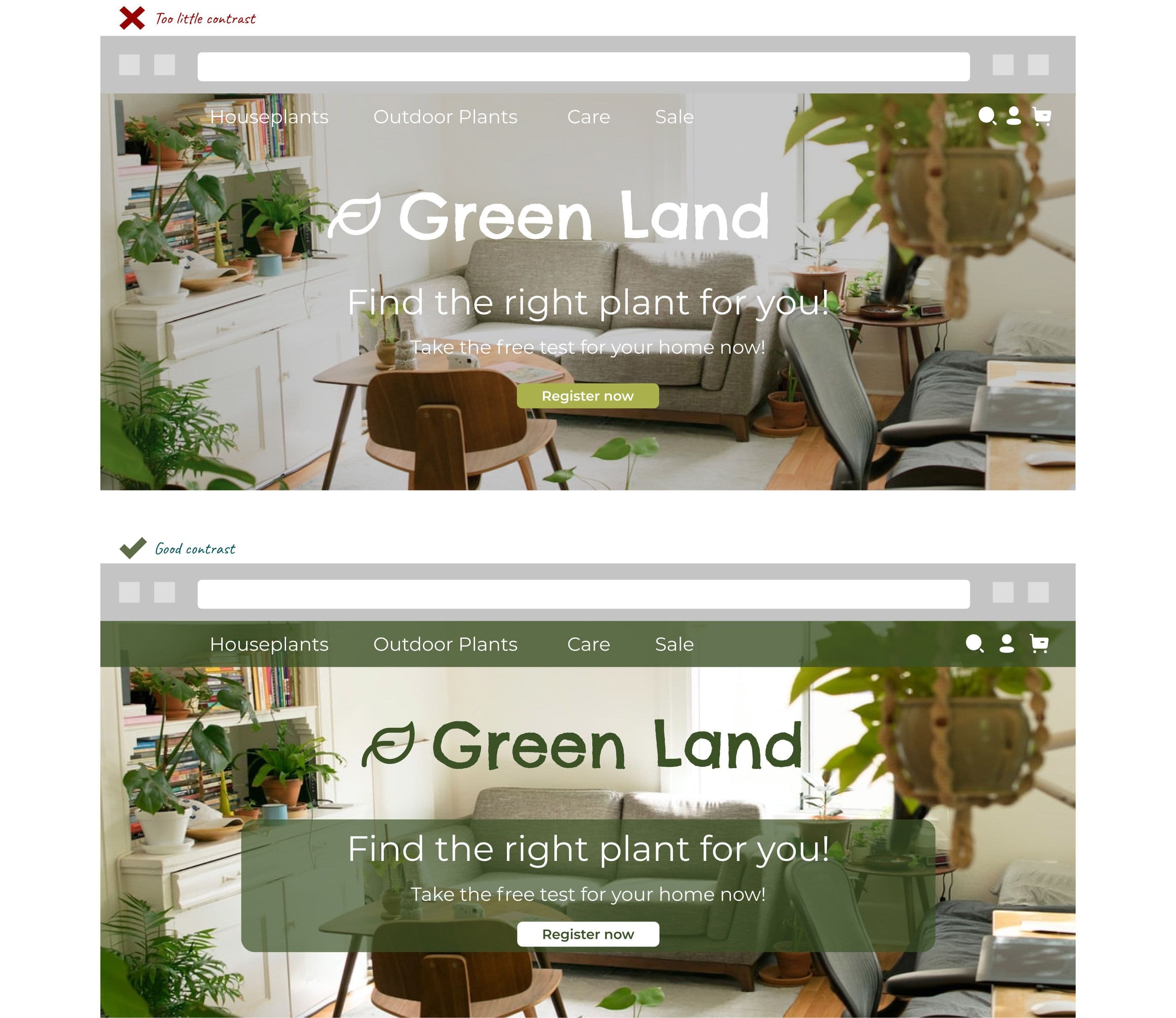
High contrast between text and background ensures that the text is easy to read. A good guideline is a contrast ratio of at least 4.5:1 for normal text and 3:1 for large text. In addition, color should not be the only method used to convey information (e.g., don’t just use red to indicate “errors”; include text as well). If you need to place text on images but the contrast is insufficient, you can add a solid-color background behind the text or darken the image.
Navigation and accessibility
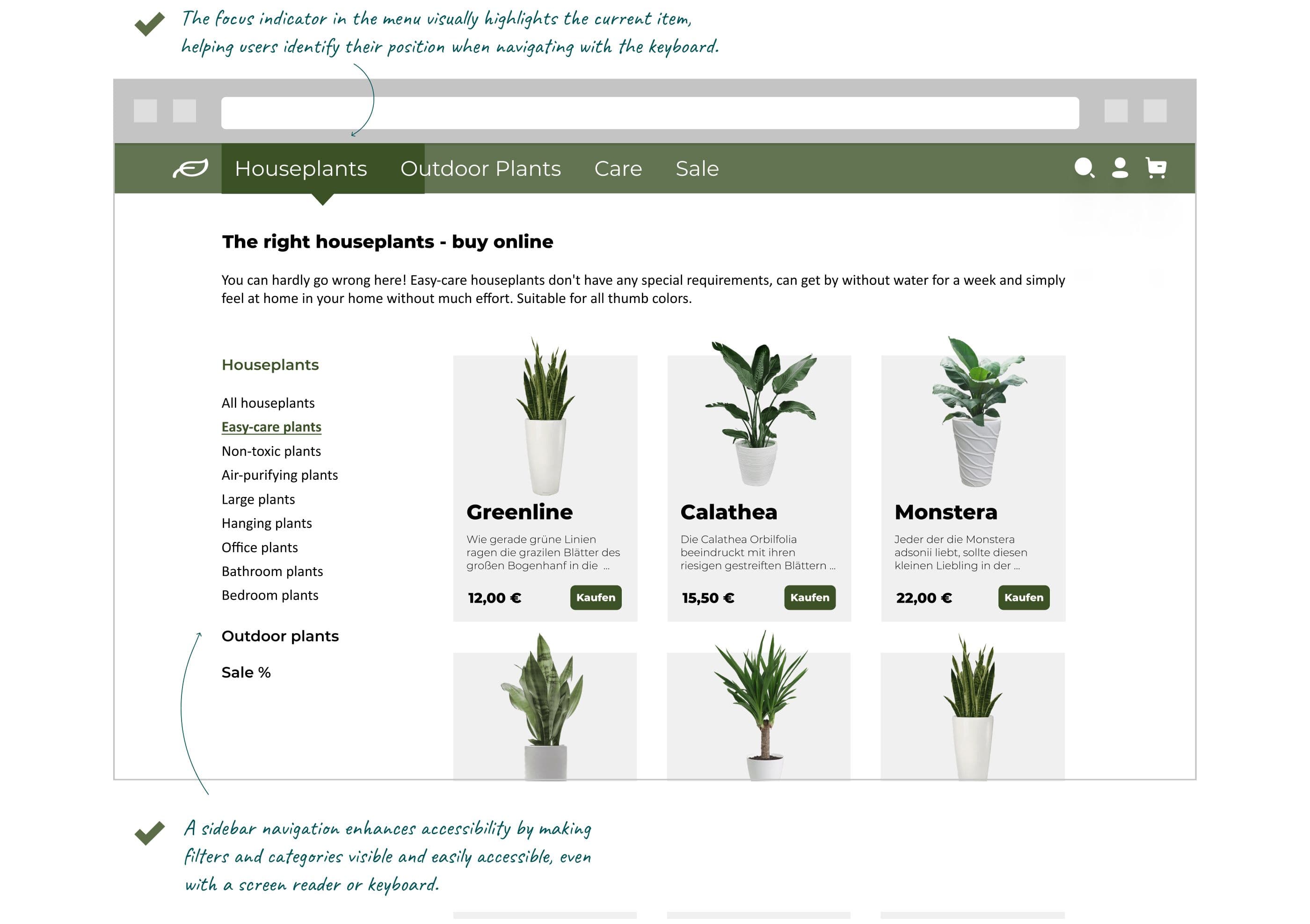
Navigation should be clear and simple and work with both a mouse and a keyboard. All interactive elements (links, buttons, forms) are accessible via the Tab key, and there is a visible focus indicator (e.g., a colored border around the button that currently has focus). New in WCAG 2.2: The focused element must not be obscured by sticky headers, cookie banners, or chat widgets.
To skip navigation and non-essential elements and go directly to the content, a “skip link” can be used. This link is placed at the top of the page and allows users to jump directly to the main content.
Alternative text for images
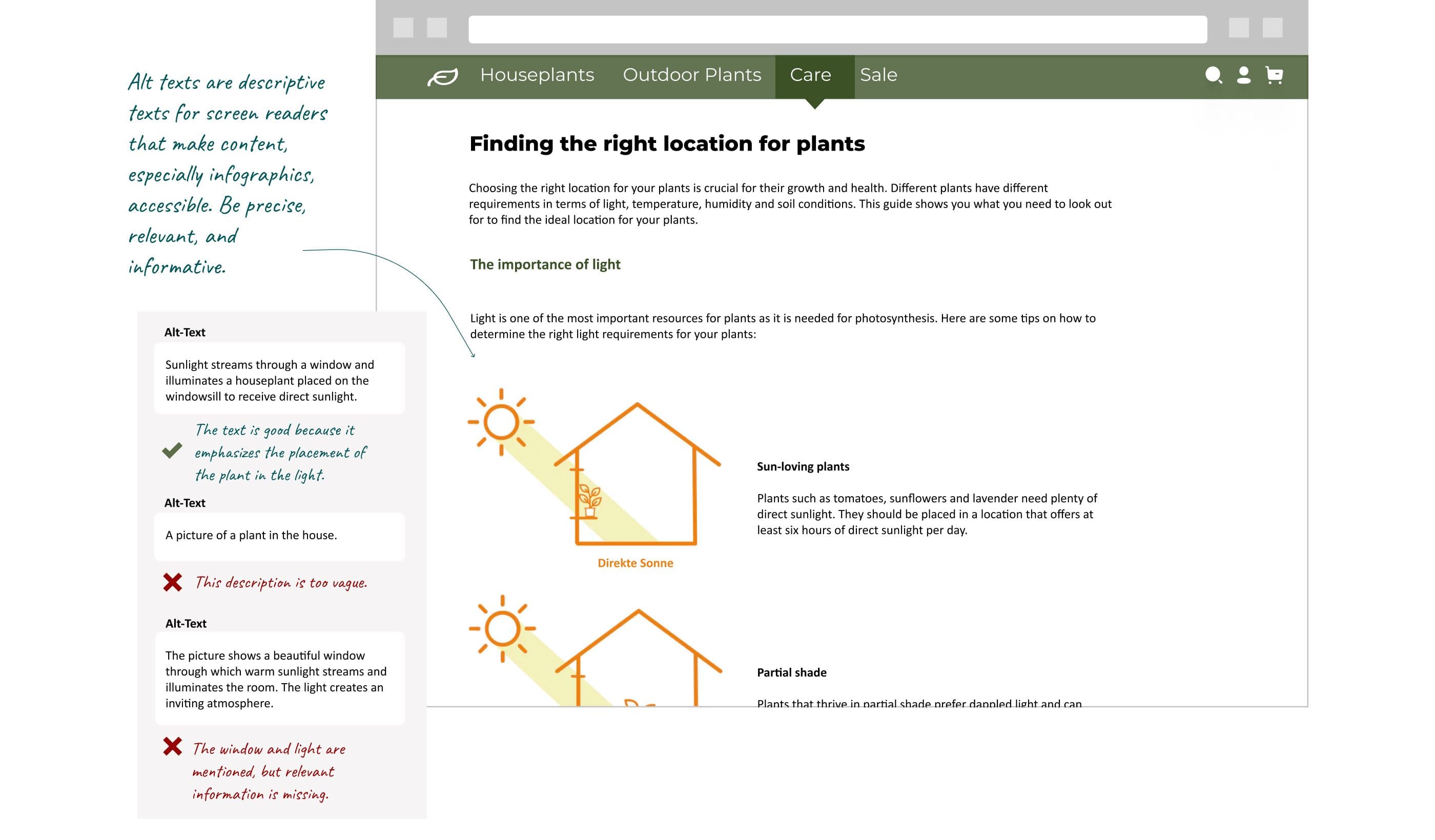
All images that convey information have descriptive alternative text (“alt text”) so that screen readers can read the content aloud. This is especially important for infographics or product images in online stores.
Good alt text highlights the plant’s placement in the light: Sunlight streams through a window and illuminates a houseplant placed on the windowsill to receive direct sunlight.
Poor alt text describes the image without including the relevant information: The image shows a beautiful window through which warm sunlight streams, illuminating the room. The light creates a welcoming atmosphere.
Forms
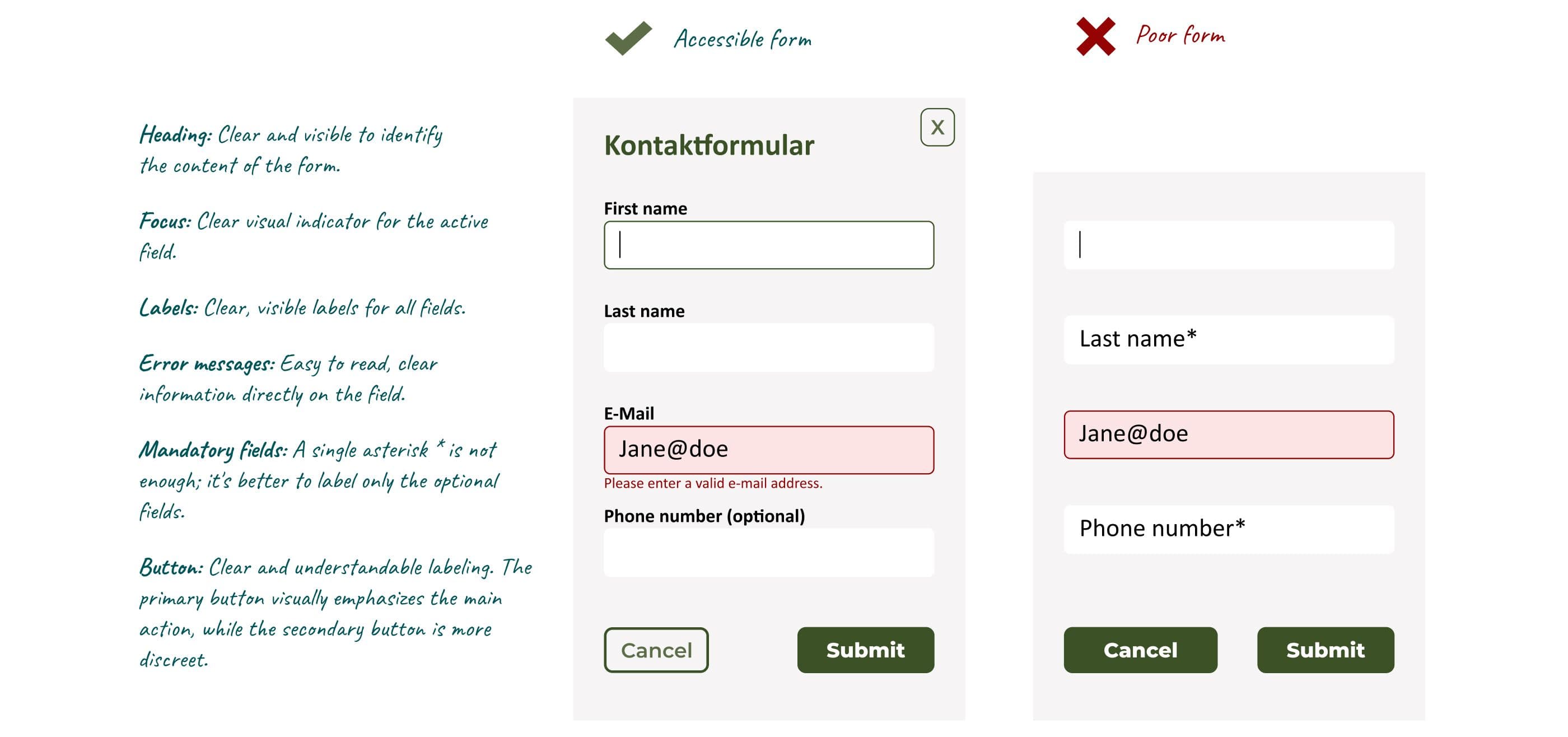
Accessible forms should have a clear heading. The active field should be visually highlighted. All fields should have unique labels instead of placeholder text. Error messages should not only be highlighted in color but must also be easy to read and appear directly next to the field. Ensure that screen reader users are notified of focus and error messages through ARIA attributes such as “aria-describedby” and “aria-invalid.” Use asterisks (*) only to mark optional fields, not required fields. Buttons should be clearly labeled, with the primary button highlighting the main action and the secondary button being more subtle.
New in WCAG 2.2: Clickable areas must be at least 24 × 24 pixels; do not re-prompt for data that has already been entered; and allow logins without manual input (e.g., using password managers and the “paste” function).
Videos and multimedia content
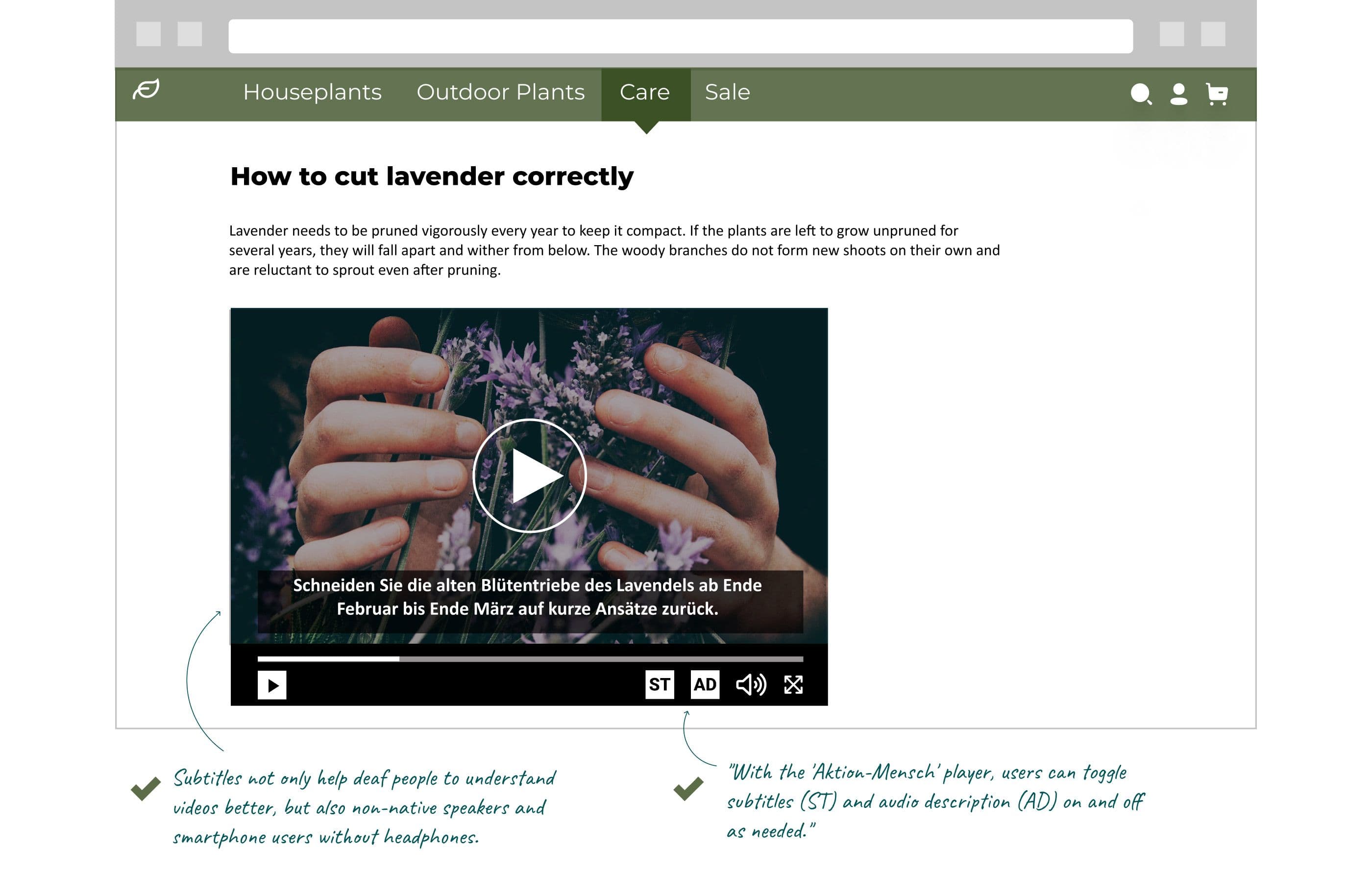
The first step toward creating an accessible video is adding captions. They not only help deaf people but also non-native speakers who don’t understand everything right away – or smartphone users riding the train without headphones who don’t want to disturb their fellow passengers. If relevant information in a video is conveyed visually and is therefore missed by blind and visually impaired users, you can use audio description. This is an audio track that can be turned on alongside the video and describes in words everything the user cannot see. With the right player, every user can turn the audio description and/or subtitles on and off as needed. Otherwise, playing both versions simultaneously can be overwhelming and distract from the content. Aktion Mensch provides such a player free of charge. Simply download and embed it, and your videos will be accessible to all.
AI and accessibility: Both an opportunity and a challenge
Today, modern AI tools can help companies implement digital accessibility more quickly and cost-effectively. For example, they can identify missing alternative text, analyze contrast levels, check heading structures, or automatically generate captions for videos. Tasks that previously required a great deal of manual effort can now be completed much more efficiently.
AI can also help with content creation. It can simplify complex texts and make them easier to understand. This benefits not only people with cognitive impairments, but also new employees, international users, or visitors who are unfamiliar with an industry’s technical terminology.
Example:
Original Text:
The modular system architecture enables cross-domain orchestration of the process landscape.
Simplified wording using AI:
The solution connects various systems and processes.
AI can help make content more understandable – and thus more accessible – especially on large websites or portals.
Nevertheless, AI has clear limitations. It can identify technical issues and simplify content. However, it cannot always determine whether users can actually complete a task successfully.
Forms are one example. The AI reliably detects:
✅ missing labels ✅ insufficient contrast ✅ missing or hard-to-read error messages
What it does not detect:
❌ why users repeatedly fill out the same field incorrectly ❌ why they abandon the process ❌ what information is missing or worded ambiguously
Let’s imagine that AI rates a form as technically accessible. Nevertheless, many users later abandon the process. It’s only during user testing that it becomes clear that many people get stuck on the “ERP System Customer Number” field because it’s unclear which number is meant.
AI detects technical issues. But it doesn’t know whether people understand the application. For that, user feedback is still needed.
AI doesn’t automatically ensure accessibility. But it does make it significantly easier to implement.
Conclusion: Accessibility as a strategic advantage in the B2B sector
Accessibility is more than just a legal requirement – it offers B2B companies decisive advantages. By implementing accessible design – such as in the areas of contrast and color schemes, navigation, alt text, forms, and multimedia content – companies can not only prevent legal risks but also improve the user experience for everyone. Accessible digital products strengthen brand image, foster customer loyalty, and facilitate collaboration with partners and business customers. Companies that proactively implement accessibility position themselves as forward-thinking and gain a long-term competitive edge. It’s time to design digital products so that they are accessible to everyone – not just for legal reasons, but because it makes all the difference.
We’ll test your website for accessibility
We’d be happy to analyze how accessible your digital products already are and what still needs to be done – or can be done. This ensures that you not only meet legal requirements but also improve your SEO and user-friendliness.

Stephanie Ebbert
Stephanie is a UX Designer and Art Director with over 12 years of experience. At communicode, she designs and optimizes digital products such as websites, online shops or apps. She advises customers from the B2B as well as from the B2C area. Her passion for developing digital products is shaped by the human-centered design mindset. Stephanie is convinced that user testing, user interviews and psychology play a bigger role in good user experiences and successful shops than just beautiful design.